



Updated November 2026. The Redmi 9A, 9AT, 9i and 9A Sport (codename dandelion, MediaTek Helio G25) are no longer updated. Xiaomi ended security support in July 2023, so the builds below are the final official firmware. Xiaomi released MIUI 12.5 (Android 11) for most regions too, but the newest builds by date for Global, EEA, India and Indonesia are MIUI 12 (Android 10). If your phone already runs MIUI 12.5, these MIUI 12 builds are an Android downgrade: don’t install them over it. All links go to Xiaomi’s servers.
Official Redmi 9A firmware: the latest MIUI 12.5 Recovery and Fastboot ROMs for all regions (8), direct from Xiaomi's servers with file checksums.
Last official Redmi 9A / 9AT / 9i firmware
| Region | Last official version | OS | Released | |
|---|---|---|---|---|
| Global | V12.0.22.0.QCDMIXM | MIUI 12, Android 10 | Apr 10, 2023 | Download |
| EEA (Europe) | V12.0.21.0.QCDEUXM | MIUI 12, Android 10 | Mar 20, 2023 | Download |
| India | V12.0.26.0.QCDINXMRedmi 9A / 9i / 9A Sport | MIUI 12, Android 10 | Feb 17, 2023 | Download |
| Indonesia | V12.0.15.0.QCDIDXM | MIUI 12, Android 10 | Feb 28, 2023 | Download |
| Russia | V12.5.7.0.RCDRUXM | MIUI 12.5, Android 11 | Oct 11, 2022 | Download |
| Turkey | V12.0.7.0.QCDTRXM | MIUI 12, Android 10 | Sep 2, 2021 | Download |
| China | V12.5.21.0.RCDCNXM | MIUI 12.5, Android 11 | Apr 20, 2023 | Download |
Fastboot ROMs, older builds and how to verify a download (the file name contains the start of its MD5): Redmi 9A firmware page.
Don’t flash Redmi 10A firmware on a Redmi 9A. The Redmi 10A uses the same codename (dandelion) and got newer MIUI 12.5 builds until 2024, for example V12.5.16.0.RCZMIXM. Those are separate ROMs for different hardware: the version code contains RCZ instead of QCD/RCD. If your phone says Redmi 10A, use the Redmi 10A section of the firmware page.
Which region is mine? Look at the end of the MIUI version in Settings → About phone: MIXM Global, EUXM Europe, INXM India, IDXM Indonesia, RUXM Russia, CNXM China. See ROM region codes explained.
How to install the Redmi 9A firmware
Recovery ROM (keeps your data, no PC): copy the .zip to the phone, open Settings → About phone → System update, tap the three dots and choose Choose update package. If the option is missing, tap the MIUI logo on that screen about 10 times to unlock it. A Recovery ROM only installs over the same region, and only the same or a newer version. The updater can’t downgrade.
Fastboot ROM (clean install, region change, fixing a bootloop): unlock the bootloader with Mi Unlock (Mi Unlock shows the waiting time, often 168 hours; China units can’t be unlocked officially). Warning: 4PDA reports that unlocking on MIUI 12.5.7 Global/Russia/EEA or 12.5.9 India makes the phone bootloop. Go back to an older build first, or see the fix in 4PDA’s Redmi 9A thread., install the Xiaomi USB drivers and flash the .tgz with Mi Flash Tool. Choose Clean all. Use Clean all and lock only with an unmodified official ROM that matches the phone’s market. Never relock a phone running a modified or other-market ROM.
Hard brick (black screen, no Fastboot): the Redmi 9A uses a MediaTek Helio G25 chip. Recovery goes through MediaTek’s download mode with SP Flash Tool. Xiaomi protects it with an authorized-account check, which community tools such as mtkclient can bypass on this chip. Use them at your own risk. Before flashing an older ROM, check anti-rollback.
Older ROMs and drivers (archive)
Our original list, kept for reference. The final builds are in the tables at the top of this page.
Redmi 9A / 9AT – Global Stable ROM
- V12.0.17.0.QCDMIXM | MIUI 12 | Android 10.0 | Recovery | Fastboot
- V12.0.16.0.QCDMIXM | MIUI 12 | Android 10.0 | Recovery | Fastboot
- V12.0.15.0.QCDMIXM | MIUI 12 | Android 10.0 | Recovery | Fastboot
- V12.0.14.0.QCDMIXM | MIUI 12 | Android 10.0 | Recovery | Fastboot
- V12.0.12.0.QCDMIXM | MIUI 12 | Android 10.0 | Recovery | Fastboot
- V12.0.11.0.QCDMIXM | MIUI 12 | Android 10.0 | Recovery | Fastboot
- V12.0.10.0.QCDMIXM | MIUI 12 | Android 10.0 | Recovery | Fastboot
- V12.0.8.0.QCDMIXM | MIUI 12 | Android 10.0 | Recovery | Fastboot
- V12.0.7.0.QCDMIXM | MIUI 12 | Android 10.0 | Recovery | Fastboot
- V12.0.6.0.QCDMIXM | MIUI 12 | Android 10.0 | Recovery | Fastboot
- V12.0.5.0.QCDMIXM | MIUI 12 | Android 10.0 | Recovery | Fastboot
- V12.0.3.0.QCDMIXM | MIUI 12 | Android 10.0 | Recovery | Fastboot
Redmi 9A / 9AT – EEA Stable ROM
- V12.0.16.0.QCDEUXM | MIUI 12 | Android 10.0 | Recovery | Fastboot
- V12.0.15.0.QCDEUXM | MIUI 12 | Android 10.0 | Recovery | Fastboot
- V12.0.14.0.QCDEUXM | MIUI 12 | Android 10.0 | Recovery | Fastboot
- V12.0.13.0.QCDEUXM | MIUI 12 | Android 10.0 | Recovery | Fastboot
- V12.0.12.0.QCDEUXM | MIUI 12 | Android 10.0 | Recovery | Fastboot
- V12.0.11.0.QCDEUXM | MIUI 12 | Android 10.0 | Recovery | Fastboot
- V12.0.10.0.QCDEUXM | MIUI 12 | Android 10.0 | Recovery | Fastboot
- V12.0.9.0.QCDEUXM | MIUI 12 | Android 10.0 | Recovery | Fastboot
- V12.0.8.0.QCDEUXM | MIUI 12 | Android 10.0 | Recovery | Fastboot
- V12.0.7.0.QCDEUXM | MIUI 12 | Android 10.0 | Recovery | Fastboot
- V12.0.6.0.QCDEUXM | MIUI 12 | Android 10.0 | Recovery | Fastboot
- V12.0.4.0.QCDEUXM | MIUI 12 | Android 10.0 | Recovery | Fastboot
Redmi 9A / 9AT – China Stable ROM
- V12.5.4.0.RCDCNXM | MIUI 12 | Android 11.0 | Recovery | Fastboot
- V12.5.1.0.QCDCNXM | MIUI 12 | Android 10.0 | Recovery | Fastboot
- V12.0.16.0.QCDCNXM | MIUI 12 | Android 10.0 | Recovery | Fastboot
- V12.0.14.0.QCDCNXM | MIUI 12 | Android 10.0 | Recovery | Fastboot
- V12.0.13.0.QCDCNXM | MIUI 12 | Android 10.0 | Recovery | Fastboot
- V12.0.12.0.QCDCNXM | MIUI 12 | Android 10.0 | Recovery | Fastboot
- V12.0.9.0.QCDCNXM | MIUI 12 | Android 10.0 | Recovery | Fastboot
- V12.0.6.0.QCDCNXM | MIUI 12 | Android 10.0 | Recovery | Fastboot
- V12.0.5.0.QCDCNXM | MIUI 12 | Android 10.0 | Recovery | Fastboot
- V12.0.4.0.QCDCNXM | MIUI 12 | Android 10.0 | Recovery | Fastboot
- V12.0.3.0.QCDCNXM | MIUI 12 | Android 10.0 | Recovery | Fastboot
- V12.0.2.0.QCDCNXM | MIUI 12 | Android 10.0 | Recovery | Fastboot
- V12.0.1.0.QCDCNXM | MIUI 12 | Android 10.0 | Recovery | Fastboot
Redmi 9A / 9AT – Indonesia Stable ROM
- V12.0.10.0.QCDIDXM | MIUI 12 | Android 10.0 | Recovery | Fastboot
- V12.0.9.0.QCDIDXM | MIUI 12 | Android 10.0 | Recovery | Fastboot
- V12.0.8.0.QCDIDXM | MIUI 12 | Android 10.0 | Recovery | Fastboot
- V12.0.7.0.QCDIDXM | MIUI 12 | Android 10.0 | Recovery | Fastboot
- V12.0.6.0.QCDIDXM | MIUI 12 | Android 10.0 | Recovery | Fastboot
- V12.0.5.0.QCDIDXM | MIUI 12 | Android 10.0 | Recovery | Fastboot
- V12.0.4.0.QCDIDXM | MIUI 12 | Android 10.0 | Recovery | Fastboot
- V12.0.3.0.QCDIDXM | MIUI 12 | Android 10.0 | Recovery | Fastboot
- V12.0.2.0.QCDIDXM | MIUI 12 | Android 10.0 | Recovery | Fastboot
- V12.0.1.0.QCDIDXM | MIUI 12 | Android 10.0 | Recovery | Fastboot
Redmi 9A / 9AT – Russia Stable ROM
- V12.0.13.0.QCDRUXM | MIUI 12 | Android 10.0 | Recovery | Fastboot
- V12.0.12.0.QCDRUXM | MIUI 12 | Android 10.0 | Recovery | Fastboot
- V12.0.11.0.QCDRUXM | MIUI 12 | Android 10.0 | Recovery | Fastboot
- V12.0.10.0.QCDRUXM | MIUI 12 | Android 10.0 | Recovery | Fastboot
- V12.0.9.0.QCDRUXM | MIUI 12 | Android 10.0 | Recovery | Fastboot
- V12.0.7.0.QCDRUXM | MIUI 12 | Android 10.0 | Recovery | Fastboot
- V12.0.6.0.QCDRUXM | MIUI 12 | Android 10.0 | Recovery | Fastboot
- V12.0.5.0.QCDRUXM | MIUI 12 | Android 10.0 | Recovery | Fastboot
- V12.0.4.0.QCDRUXM | MIUI 12 | Android 10.0 | Recovery | Fastboot
- V12.0.3.0.QCDRUXM | MIUI 12 | Android 10.0 | Recovery | Fastboot
- V12.0.1.0.QCDRUXM | MIUI 12 | Android 10.0 | Recovery | Fastboot
Redmi 9A / 9AT – India Stable ROM
- V12.0.19.0.QCDINXM | MIUI 12 | Android 10.0 | Recovery | Fastboot
- V12.0.18.0.QCDINXM | MIUI 12 | Android 10.0 | Recovery | Fastboot
- V12.0.17.0.QCDINXM | MIUI 12 | Android 10.0 | Recovery | Fastboot
- V12.0.16.0.QCDINXM | MIUI 12 | Android 10.0 | Recovery | Fastboot
- V12.0.13.0.QCDINXM | MIUI 12 | Android 10.0 | Recovery | Fastboot
- V12.0.11.0.QCDINXM | MIUI 12 | Android 10.0 | Recovery | Fastboot
- V12.0.9.0.QCDINXM | MIUI 12 | Android 10.0 | Recovery | Fastboot
- V12.0.8.0.QCDINXM | MIUI 12 | Android 10.0 | Recovery | Fastboot
- V12.0.6.0.QCDINXM | MIUI 12 | Android 10.0 | Recovery | Fastboot
Redmi 9A / 9AT – Turkey Stable ROM
- V12.0.7.0.QCDTRXM | MIUI 12 | Android 10.0 | Recovery | Fastboot
- V12.0.6.0.QCDTRXM | MIUI 12 | Android 10.0 | Recovery | Fastboot
- V12.0.5.0.QCDTRXM | MIUI 12 | Android 10.0 | Recovery | Fastboot
- V12.0.4.0.QCDTRXM | MIUI 12 | Android 10.0 | Recovery | Fastboot
- V12.0.3.0.QCDTRXM | MIUI 12 | Android 10.0 | Recovery | Fastboot
- V12.0.2.0.QCDTRXM | MIUI 12 | Android 10.0 | Recovery | Fastboot
Download drivers and tools for Xiaomi Redmi 9A / 9AT
- QD Loader: QDLoaderHS_USB_Driver_64bit_Setup.exe
- Latest MiFlash 20200314: MiFlash20200314.zip
- XiaoMiTool V2: XMT2_Win_Setup_20.7.28.exe
- Platform-tools (adb/fastboot) r.30.0.4: tools_r30.0.4-windows.zip
- HashTabv6.0.0.34: HashTab_v6.0.0.34_Setup.exe
Xiaomi Redmi 9A / 9AT Specs Overview
Hardware and Performance
Both the Redmi 9A and the 9AT come with the octa-core Mediatek Helio G25 processor clocked at 2.0 GHz. The GPU is the IMG PowerVR GE8320 @ 600 MHz. The Antutu score for the two phones is 102.778.
The two phones feature a plastic body with a sleek design that is made to fit your palm perfectly.
The only difference between the Redmi 9A and the 9AT is that the 9AT comes with a third microphone for improved audio quality. Other than that, the two devices are virtually identical.
Both phones have:
- Bluetooth 5.0
- FM radio
- GPS
- Dual Nano-Sim slot
- microSD expansion slot
- proximity sensor
- light sensor
- accelerometer
- ambient light
- microUSB 2.0 port
Software
The Xiaomi Redmi 9A and 9AT run Android 10 with Xiaomi’s custom MIUI 12 skin.
Size
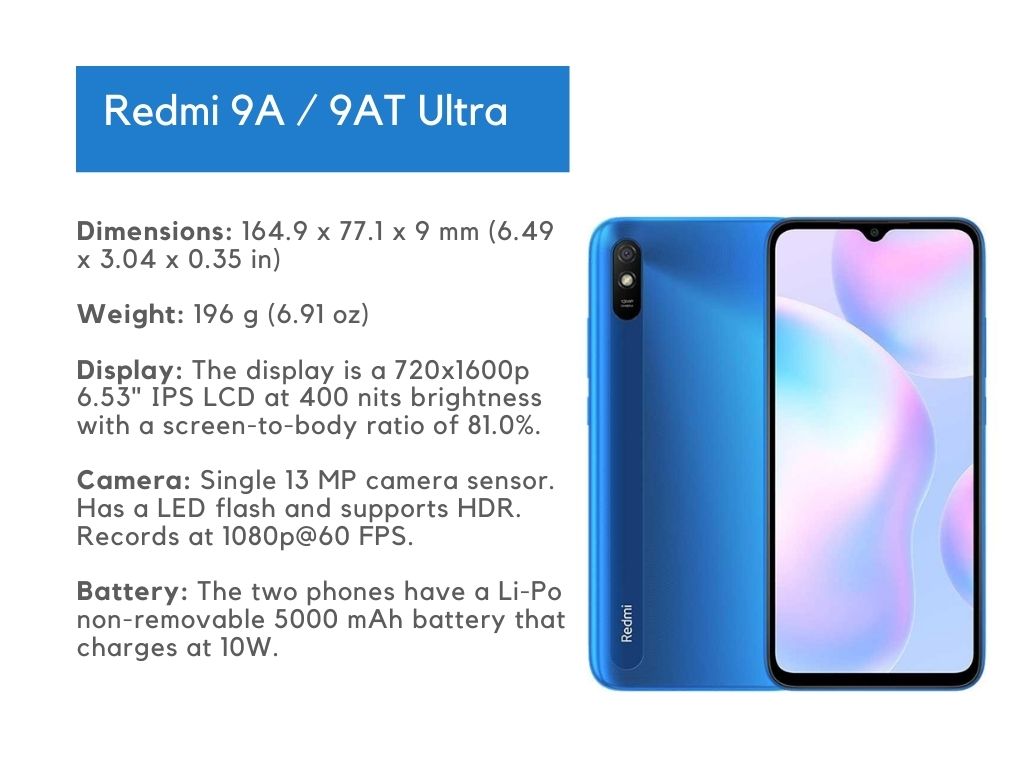
Dimensions: 164.9 x 77.1 x 9 mm (6.49 x 3.04 x 0.35 in)
Weight: 196 g (6.91 oz)
Display
The display is a 720x1600p 6.53″ IPS LCD at 400 nits brightness with a screen-to-body ratio of 81.0%. The display is protected by Corning Gorilla Glass 3.
Camera
Only a single 13 MP camera sensor. Has a LED flash and supports HDR. Records at 1080p@60 FPS.
The selfie camera is a 5 MP that supports HDR and 1080p@30 FPS video.
Battery
The two phones have a Li-Po non-removable 5000 mAh battery that charges at 10W.
Speakers
The phones have a single down-firing speaker. They also have a 3.5mm headphone jack.
Availability / Price
The two phones come in carbon gray, ocean green, and sky blue. The storage options are either 32GB and 2GB RAM or 32GB and 3GB RAM.
There is also a China-only variant with 128GB internal storage and 6GB RAM. Pricing starts at € 84.00 for the Redmi 9A and € 104.00 for the Redmi 9AT.
If you do not need a third microphone, the Redmi 9A is the better option. The phones are available in India, China, and parts of Europe.
Sources: 4PDA Redmi 9A firmware thread (header; MIUI 12.5 unlock bootloop warning by Denis55550; MTKClient and no-auth unbrick posts linked by moderator sergrauber); XiaomiFirmwareUpdater tracker data; 4PDA Xiaomi FAQ by Dima_Apatity; 4PDA bootloader unlock thread (varalex)..
Xiaomi no longer updates the Redmi 9A
Xiaomi has ended software updates for the Redmi 9A, so no new firmware is expected. For new Xiaomi firmware, HyperOS 4 news and guides, follow our Telegram channel.